LLM-scaffolding
AI interfaces beyond the chat
LLM-scaffolding#
A couple of weeks ago, I went to an event about AI and trading. The usual “oh yes, AI is great, it is going to change everything.” But almost every speaker said something along the lines, “but it won’t be a chat app.”
Yeah, chats are great. Everybody uses them.
But I very much doubt that in five years the way we interact with AI will be a chatbox.
But if not chat, then what?
In this post I’m going to present a possible answer: a way of developing rich UIs that are AI-centric.
I tried to give a shorter version of this answer to someone who is tech-savvy (hi Paul) and failed. I also tried to give an even shorter version to my wife, who is less savvy but has a lot of common sense. I failed as well.
So let’s try with a bit of a longer answer.
But if you’ve come for the calculator, this is how it looks:
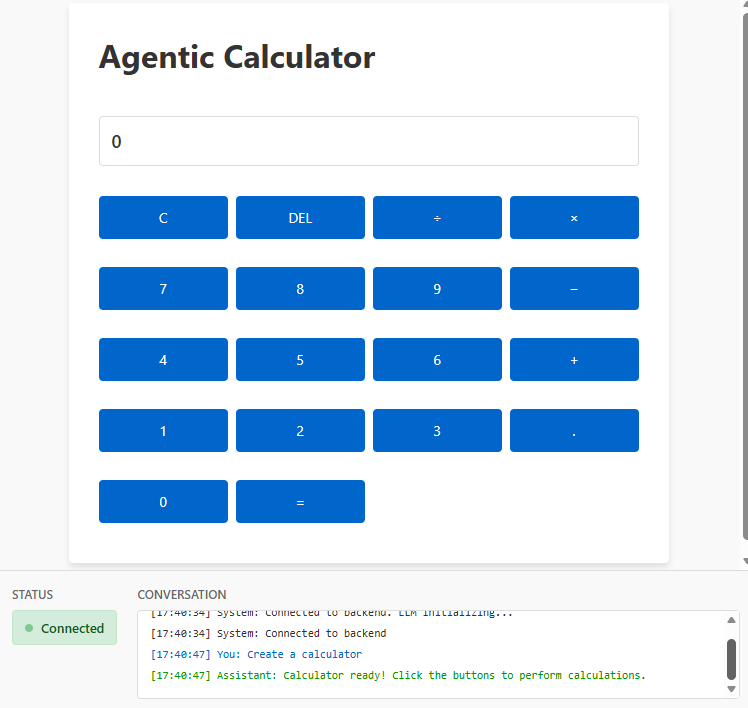
and this is where you can find it:
https://github.com/gonfva/LLM-Scaffolding-Calculator/
On the shoulders of giants#
First, I want to be clear that this idea is not something I came up with myself. I haven’t seen the code for any demo of what I’m presenting here, but I can point to a few things that certainly contain the core.
In my mind, I blame @javilop from Twitter/X for opening my mind. But the previous link is in Spanish, so I asked Grok to create a translation. Pay attention to the section “All software will run on the LLM layer”. The other sections are very interesting as well, but that section is relevant for today.
That is the stage: “All software will run on the LLM layer”
The next reference I want to point at is this other study from Google where they were able to run a model that generates images from Doom, and the images change in response to user actions. So yes: people are playing Doom, but the game isn’t “coded” anywhere. The model doesn’t generate Doom’s code; it generates images.
The final reference is “Imagine with Claude”
I cannot emphasize how important this less-than-two-minute clip is. If you haven’t watched it, do so now. I won’t be offended if you never return to this post (I will never know).
Meet llm-scaffolding-calculator#
When I saw that video from Claude, I started thinking about it.
In the end I resorted to Claude, which provided a possible way. Is it the same way that “Imagine with Claude” was built? Maybe, maybe not. But I had to test it.
The test is available as an open-source project.
You can check it out and play with it. It requires an ANTHROPIC API key. In my tests it consumed a non-trivial number of tokens (it cost about $1 over a couple of days with very simple tests). Plugging an API key into a random project might not be the best idea.
But you can inspect the code and try to understand it. There is no real need to execute it.
How does it work?#
It’s a FastAPI app (Python) that serves a WebSocket endpoint and a couple of static files.
At the WebSocket endpoint we have a Claude agent with some tools defined (the tools are the key; I’ll explain them below). Every interaction is sent to the Claude API. The Claude API might respond by invoking a tool.
When a tool is used, it changes internal state on the webserver. The WebSocket loop then sends the new state to the frontend, which updates the UI accordingly.
Copying a diagram that Claude Code produced:
┌─────────────────────────────────────────────────┐
│ LLM (Architect)                                 │
│ - Understands user intent                       │
│ - Designs UI structure                          │
│ - Defines interaction rules                     │
└────────────┬────────────────────────────────────┘
             │
             │ Tool Calls (JSON)
             ▼
┌─────────────────────────────────────────────────┐
│ Backend (Mediator)                              │
│ - Validates tool calls                          │
│ - Manages session state                         │
│ - Routes significant events back to LLM         │
└────────────┬────────────────────────────────────┘
             │
             │ Rendering Instructions
             ▼
┌────────────────────────────────────────────────────────────────────────────────────┐
│ Client (Executor)                                                                  │
│ - Renders UI from tool calls                                                       │
│ - Maybe executes behaviors locally (fast loop, not initially, optimization later)  │
│ - Notifies backend only for significant events                                     │
└────────────────────────────────────────────────────────────────────────────────────┘
The primitives#
You can see the code but these were the tools defined:
- display_text
- create_button
- create_container
- update_element
These are only a set of possible options. And the key is correctly defining the tools used by the Claude API.
I’m going to paste a copy from my conversation with Claude below.
Defining Primitives is the Main Difficulty
This is the hardest part of the whole system. You need to find the right abstraction level:
- Too low-level:
- create_div(id, class)
- set_style(element_id, property, value)
- add_event_listener(element_id, event, handler_id)
- Too high-level:
- create_complete_calculator()
- create_complete_text_editor()
- Just right (probably):
- create_window(title, width, height) → window_id
- add_text(window_id, content, style?)
- add_input(window_id, type, placeholder) → input_id
- add_button(window_id, label) → button_id
- on_button_click(button_id) → trigger_event
- get_input_value(input_id) → value
- update_text(element_id, new_content)
The difficulty is:
- Granularity: Finding the right level of abstraction
- Event handling: Deciding which interactions loop back to Claude vs. handled client-side
- State management: What state lives where (browser vs. backend vs. Claude’s context)
Why the name LLM-scaffolding?#
Because Claude decided it
My Personal Favorite:
"LLM-Scaffolded Interaction" or "Declarative Agent UI"
These capture the essence: the LLM sets up the structure declaratively (via tools),
but doesn't participate in the runtime execution loop.
So slow, man#
If you happened to download my code and tried to run it, you will see that it is slow. Slow to load the calculator and slow to react to key presses.
Who in their right mind would use something like this? Something so slow for a simple calculator!
The code is slow because I really wanted to show how the paradigm works. “Can you optimize it?” Yes. When I was discussing with Claude how to approach this LLM-scaffolding idea, it suggested that the best approach would be hybrid: some interactions in the browser, others on the LLM. Check the conversation on the link above.
So yes, I could speed it up a lot by adding some callbacks.
The backend could use async execution combined with real queues—maybe even a different programming language.
Do I need to send the whole state to the browser? Or only the deltas?
Can I have a create_calculator primitive?
There are many possible optimizations.
But we would all miss the point.
But why?#
“OK. Let’s assume speed doesn’t matter. Why would you run a calculator with an LLM layer?”
Ah, my friend. That’s the key question.
And the answer is What if the app you use all day could anticipate your desires? What if the UI could surface relevant information to you? What if the UI could present that information in a way that matters to you?
No matter what kind of app. Be it JIRA, email, or trading software.
Chat won’t be the future UI. “Her” is an interesting movie, but I don’t think the future will be audio-only either.
Conclusion#
I wanted to understand “Imagine with Claude”, so I asked Claude and explored this LLM-scaffolding approach.
I don’t even know if this was how “Imagine with Claude” was built. There might be a different way.
But what I do see is that these interfaces might be coming.
And I’m not the only one
Elon Musk tells Joe Rogan about what's to be expected with phones.
— Joe Rogan Podcast News (@joeroganhq) November 1, 2025
pic.twitter.com/F8bCE2Tkac